Agent Sprite Forge 不只生 Sprite Sheet:用 Prompt Pack 組出攻擊回饋包
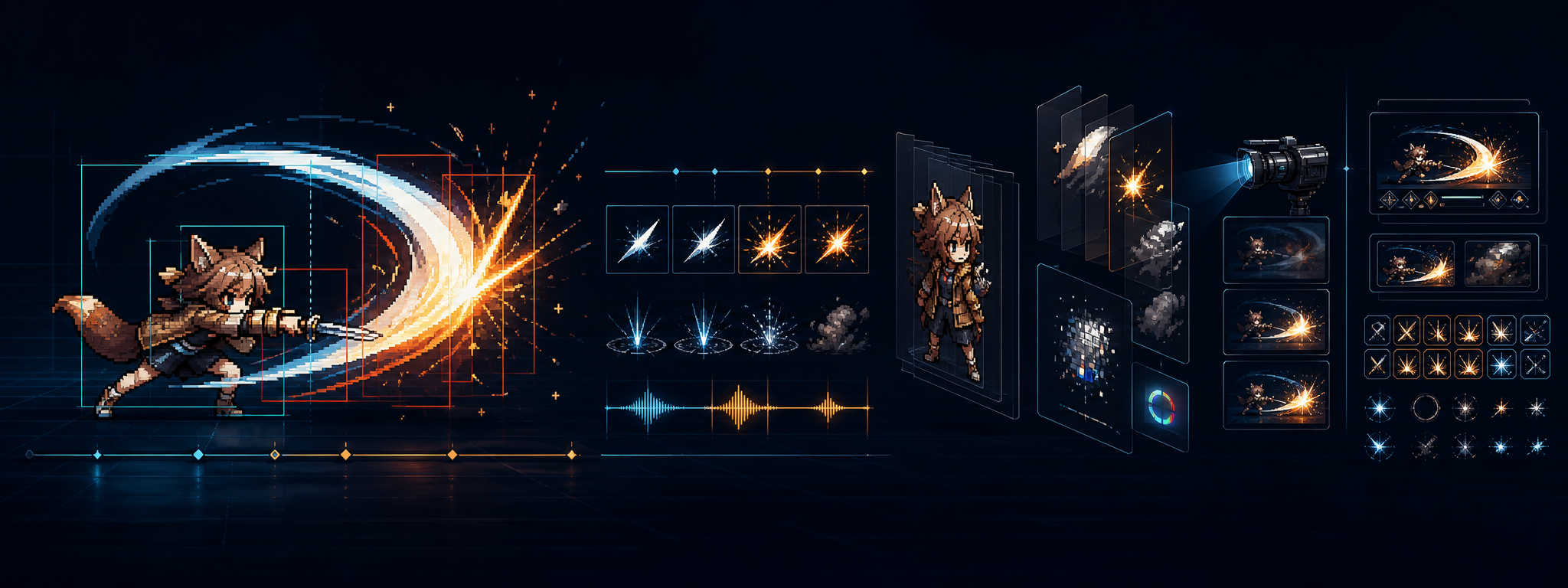
AI 生成 sprite sheet 最容易讓人誤會的地方,是以為「角色動作圖生出來」就等於可以進遊戲了。
實際上不是。
一個角色攻擊如果只有本體 sprite sheet,大概只能得到:
idle → windup → slash → recovery → idle這只能代表角色做了動作,但還不一定有手感。玩家真正感受到攻擊,通常來自一整套回饋:
角色前搖
→ 攻擊軌跡
→ 命中火花
→ 敵人閃白
→ 敵人擊退
→ 血條變化
→ hit stop
→ camera shake
→ camera zoom
→ 音效
所以 Agent Sprite Forge 最值得看的地方,不只是 $generate2dsprite 可以生角色圖,而是它本來就有一套 agent-driven asset workflow:
自然語言需求
→ agent 決定 asset plan
→ image generation 產 raw visual
→ 本地 processor 去背、切格、對齊、驗證
→ 輸出透明 PNG、frames、GIF、metadata
這讓它很適合擴展成 攻擊素材包生成器。
不是只產:
hero_attack.png而是產:
attack_light/
  character/
  fx/
  ui/
  data/
  preview/
也就是一整組可以交給 Godot / Unity 使用的 attack package。
Agent Sprite Forge 本來支援什麼
Agent Sprite Forge repo 裡主要有兩個 Codex skill:
| Skill | 用途 |
|---|---|
$generate2dsprite | 角色、怪物、props、spell、projectile、impact、FX、animation sheet |
$generate2dmap | 地圖、分層場景、prop pack、collision、trigger zones、Godot scene |
這篇主要看 $generate2dsprite。
官方文件裡,generate2dsprite 已經定義了很多重要規則:
- 角色本體和大型 FX 要分開。
- Hero attack body sheet 預設應該是 body-only。
- slash arc、muzzle flash、projectile、impact burst 要另外生成。
- 原始生成圖建議用純
#FF00FF洋紅背景,方便後處理去背。 - animated body 不建議直接用
1x4長條,容易漂移;4 幀動作通常用2x2。 - 每個 frame 要保持角色置中、尺度一致、腳底 anchor 穩定。
- prompt 要由 agent 手寫,不靠腳本生創意 prompt。
- 輸出會保留
prompt-used.txt和pipeline-meta.json。
這些規則其實已經很接近可用的遊戲資產管線。
差別是,官方 prompt 範例偏短:
Use $generate2dsprite to create a wizard spell bundle with cast, projectile, and impact sprites.如果要用在實際專案,我會把它整理成一整組 Prompt Pack。
不要只寫一個 Prompt,要拆成 Prompt Pack
一個攻擊動作至少拆成四層:
Character Layer
VFX Layer
Feedback Layer
Integration Layer
對應到 Agent Sprite Forge,就是不同生成任務。
| Layer | 內容 | 是否需要圖 |
|---|---|---|
| Character Layer | 角色本體 idle / walk / attack / hurt | 要 |
| VFX Layer | slash trail、hit spark、impact ring、dust | 要 |
| UI Layer | 血條、鎖定提示、狀態 icon | 要 |
| Feedback Layer | hit stop、camera shake、knockback、flash | 不一定 |
| Integration Layer | hitbox、timeline、manifest、preview | 不一定 |
所以 prompt 不該只寫:
幫我生成一個攻擊特效而是要變成:
1. 生成角色本體攻擊 sheet
2. 生成 slash trail sheet
3. 生成 hit spark sheet
4. 生成 impact ring sheet
5. 生成 UI icons
6. 產生 hitbox metadata
7. 產生 attack manifest
8. 產生 before / after preview
Prompt Pack 1:角色基準圖
第一步不是直接生攻擊,而是先定角色 identity。
角色如果沒有穩定 reference,後面每一個動作都可能長得不一樣。
Use $generate2dsprite to create a single reference sprite for a top-down 2.5D wizard cat player character.

Asset type:
- player character
- single reference sprite

Style:
- cute indie game style
- pixel-inspired 2D sprite
- top-down 3/4 view
- readable at small size
- transparent-ready sprite workflow

Character design:
- small white cat wizard
- blue wizard hat
- short blue cape
- tiny wand
- round silhouette
- friendly face
- simple readable shapes
- limited color palette

Output requirements:
- single full-body sprite
- solid #FF00FF background
- centered subject
- full body visible
- stable bottom/feet anchor
- no attack VFX
- no slash trail
- no particles
- no background scene
這個輸出後,要把它當作後續所有 sprite 的 reference。
Agent Sprite Forge 本來就支援 reference-guided sprite animation,但它的規則是:如果要用 reference,圖片要先出現在對話上下文裡,不要只丟路徑。
Prompt Pack 2:Idle / Move 基礎動作
攻擊之前,要先有 idle 和 walk / move。這是後面判斷角色比例是否穩定的基準。
Idle prompt
Use $generate2dsprite to create a 2x2 idle animation sheet for the same wizard cat player character shown in the visible reference image.

Asset type:
- player
- idle animation

Style:
- preserve the exact identity from the reference
- cute pixel-inspired top-down 3/4 sprite
- same color palette
- same hat, cape, wand, face, body proportions

Animation:
- 4 frames
- subtle breathing motion
- slight cape movement
- wand remains close to body
- no walking
- no attack
- no VFX

Sheet requirements:
- 2x2 grid
- solid #FF00FF background
- same canvas size per cell
- character centered in every cell
- stable feet/bottom anchor
- consistent scale across frames
- no body parts crossing cell edges

Output:
- raw sheet
- cleaned transparent sheet
- frame PNGs
- animation GIF
- prompt-used.txt
- pipeline-meta.json
Walk prompt
Use $generate2dsprite to create a 4-direction top-down walking sprite sheet for the same wizard cat player character.

Asset type:
- player
- walk animation

View:
- top-down 3/4

Directions:
- down
- left
- right
- up

Animation:
- 4 frames per direction
- small cute stepping motion
- cape and hat move subtly
- wand stays attached to the body
- no attack VFX
- no dust trails

Sheet requirements:
- canonical 4-direction locomotion sheet
- solid #FF00FF background
- consistent character scale
- stable feet anchor
- centered in each frame
- no cropping
這裡可以直接利用 Agent Sprite Forge 的強項:它本來就適合產 4-direction player sheet。
Prompt Pack 3:攻擊本體 Body Sheet
這一段最重要。
攻擊本體不要把 slash arc、hit spark、爆炸全部畫進去。官方 generate2dsprite 規則也明確說:hero attack body sheets 預設應該是 body-only。
Use $generate2dsprite to create a 2x3 light melee attack body animation sheet for the same wizard cat player character.

Asset type:
- player
- attack body animation

Reference:
- preserve the same wizard cat identity from the visible reference image
- same hat, cape, wand, face, body size, and color palette

Action:
- short wand slash attack
- clear anticipation
- quick swing
- short recovery
- body-only animation

Animation:
- 6 frames
- frame 1: idle transition
- frame 2: windup, wand pulls back
- frame 3: swing starts
- frame 4: active hit frame
- frame 5: recovery
- frame 6: return to idle

Important:
- no slash trail
- no hit spark
- no impact burst
- no dust cloud
- no detached VFX
- no projectile
- no enemy
- no background

Sheet requirements:
- 2x3 grid
- solid #FF00FF background
- same canvas size per cell
- character centered in every cell
- stable bottom/feet anchor line
- consistent body scale
- wand must stay inside the cell
- no frame cropping
- no limbs or cape crossing cell edges

Output:
- raw sheet
- transparent cleaned sheet
- frame PNGs
- attack animation GIF
- prompt-used.txt
- pipeline-meta.json
這個 prompt 的核心是:
body-only
no detached VFX
stable anchor
2x3 grid
否則 AI 很容易把一堆光效畫進角色 sheet,後面很難調整。
Prompt Pack 4:Slash Trail
攻擊軌跡要獨立生成。
Use $generate2dsprite to create a slash trail FX sprite sheet for a short wand melee attack.

Asset type:
- fx
- slash trail

Style:
- cute pixel-inspired indie game VFX
- clean readable shape
- white core
- warm orange glow
- transparent-ready

Animation:
- 4 frames
- frame 1: thin arc appears
- frame 2: brightest and widest arc
- frame 3: arc fades
- frame 4: almost gone

Shape:
- curved slash arc
- direction: lower-left to upper-right
- compact enough for a top-down melee attack
- no character
- no enemy
- no weapon handle
- no background

Sheet requirements:
- 2x2 grid
- solid #FF00FF background
- centered FX in each cell
- consistent scale
- enough padding
- no cropping

Output:
- transparent FX sheet
- frame PNGs
- animation GIF
- prompt-used.txt
這張之後在 engine 裡掛在 weapon_tip 或攻擊方向上。
Prompt Pack 5:Hit Spark
命中火花要在 on_hit 時生成,不應該跟角色 attack body 綁死。
Use $generate2dsprite to create a hit spark impact FX sprite sheet for a melee attack.

Asset type:
- impact
- hit spark

Style:
- pixel-inspired 2D combat VFX
- bright white center
- orange and yellow sparks
- fast and punchy
- readable on dark or gray ground

Animation:
- 5 frames
- frame 1: tiny white impact point
- frame 2: strongest burst
- frame 3: sparks spread outward
- frame 4: sparks fade
- frame 5: almost gone

Motion:
- sparks should burst along the attack direction
- slightly asymmetric, not a perfect circle
- suitable for sword or wand hit impact

Restrictions:
- no character
- no enemy
- no background
- no text
- no UI

Sheet requirements:
- use a compact grid suitable for 5 frames
- solid #FF00FF background
- centered impact point
- transparent-ready
- no cropping
Prompt Pack 6:Impact Ring
這個不是每一招都需要,但如果想讓命中感更明確,很值得補。
Use $generate2dsprite to create a small impact ring FX sprite sheet.

Asset type:
- fx
- impact ring

Style:
- clean pixel-inspired combat feedback
- white ring with soft orange edge
- fast expanding shock ring
- subtle, not a huge explosion

Animation:
- 4 frames
- frame 1: small bright ring
- frame 2: ring expands
- frame 3: ring becomes thinner
- frame 4: ring fades out

Restrictions:
- no character
- no enemy
- no background
- no debris
- no text

Sheet requirements:
- 2x2 grid
- solid #FF00FF background
- centered ring
- consistent scale
- transparent-ready
Prompt Pack 7:Dust Puff / Ground Feedback
如果角色有 dash、knockback、重擊,地面灰塵很有用。
Use $generate2dsprite to create a small dust puff FX sprite sheet for top-down melee combat.

Asset type:
- fx
- dust puff

Style:
- soft pixel-inspired dust
- warm gray / beige
- subtle and readable
- suitable for ground contact

Animation:
- 4 frames
- frame 1: small dust burst
- frame 2: dust expands
- frame 3: dust separates into small puffs
- frame 4: fade out

Use cases:
- enemy knockback
- player step impact
- attack recovery

Restrictions:
- no character
- no enemy
- no weapon
- no background

Sheet requirements:
- 2x2 grid
- solid #FF00FF background
- centered dust
- transparent-ready
Prompt Pack 8:UI 回饋素材
Agent Sprite Forge 不只能做角色,也可以做 UI / HUD icons。但這一類要簡單,不能讓 AI 畫太複雜。
血條 prompt
Use $generate2dsprite to create a small enemy health bar UI asset pack.

Asset type:
- ui
- health bar

Style:
- simple indie game UI
- readable at small size
- matches cute pixel-inspired combat game
- clean shapes

Assets:
- empty health bar frame
- red current health fill
- pale delayed damage fill
- small elite enemy health bar variant
- small boss health bar variant

Requirements:
- transparent-ready
- solid #FF00FF background
- no text labels
- no character
- no background
- export individual transparent PNG assets if possible
Lock marker prompt
Use $generate2dsprite to create a small target lock marker UI sprite.

Asset type:
- ui
- lock marker

Style:
- clean pixel-inspired UI
- readable on top-down battlefield
- subtle blue-white color
- circular target marker
- suitable for placing under or above an enemy

Animation:
- optional 4-frame pulse
- soft opacity change
- no large glow

Requirements:
- solid #FF00FF background
- transparent-ready
- centered marker
- no text
Prompt Pack 9:Attack Manifest
這個不需要生圖,但要讓 agent 產資料。這就是整個攻擊包的核心。
Create an attack manifest JSON for the wizard cat light melee attack.

Use these assets:
- character/wizard_cat_attack_light.png
- fx/slash_arc_light.png
- fx/hit_spark_orange.png
- fx/impact_ring_small.png
- fx/dust_puff_small.png
- ui/enemy_health_bar.png
- ui/lock_marker.png

Attack design:
- light melee attack
- short wand slash
- 6 character frames
- 12 fps
- hitbox active during frames 3 and 4
- slash trail appears when swing starts
- hit spark appears only on hit
- impact ring appears only on hit
- enemy flashes white on hit
- enemy receives small knockback
- camera shakes briefly on hit
- slight camera zoom during attack

Output JSON fields:
- id
- fps
- duration
- animation
- vfx
- hitbox
- feedback
- ui
- audio_cues
- engine_notes

Make the manifest engine-readable and keep all file paths relative.
輸出可以長這樣:
{
  "id": "wizard_cat_light_attack",
  "fps": 12,
  "duration": 0.5,
  "animation": {
    "sprite": "character/wizard_cat_attack_light.png",
    "frames": 6,
    "grid": "2x3",
    "anchor": [0.5, 0.85]
  },
  "vfx": [
    {
      "id": "slash_arc",
      "sprite": "fx/slash_arc_light.png",
      "spawn_time": 0.12,
      "attach_to": "weapon_tip",
      "duration": 0.15
    },
    {
      "id": "hit_spark",
      "sprite": "fx/hit_spark_orange.png",
      "spawn_time": "on_hit",
      "attach_to": "hit_point",
      "duration": 0.12
    },
    {
      "id": "impact_ring",
      "sprite": "fx/impact_ring_small.png",
      "spawn_time": "on_hit",
      "attach_to": "hit_point",
      "duration": 0.16
    },
    {
      "id": "dust_puff",
      "sprite": "fx/dust_puff_small.png",
      "spawn_time": "on_knockback",
      "attach_to": "enemy_feet",
      "duration": 0.25
    }
  ],
  "hitbox": {
    "active_frames": [3, 4],
    "shape": "arc",
    "radius": 1.4,
    "angle": 90,
    "offset": [0.45, 0.1]
  },
  "feedback": {
    "hit_stop": 0.05,
    "enemy_flash": {
      "color": "#ffffff",
      "duration": 0.05
    },
    "knockback": {
      "distance": 0.45,
      "duration": 0.12
    },
    "camera_shake": {
      "duration": 0.08,
      "amplitude": 0.12
    },
    "camera_zoom": {
      "value": 0.94,
      "return_duration": 0.2
    }
  },
  "ui": {
    "enemy_health_bar": "ui/enemy_health_bar.png",
    "lock_marker": "ui/lock_marker.png",
    "delayed_damage_bar": true
  },
  "audio_cues": [
    {
      "time": 0.1,
      "id": "wand_whoosh"
    },
    {
      "time": "on_hit",
      "id": "hit_impact"
    }
  ]
}
Prompt Pack 10:整包生成任務
如果想一次叫 Agent Sprite Forge 統包,可以寫成這樣:
Use $generate2dsprite to create a complete 2D top-down light attack asset package for a wizard cat player character.

Goal:
Create an engine-ready attack package, not just a single sprite sheet.

Character:
- cute white wizard cat
- blue wizard hat
- short blue cape
- tiny wand
- top-down 3/4 view
- pixel-inspired indie game style

Generate:
1. single character reference sprite
2. 2x2 idle animation sheet
3. 4-direction walk sheet
4. 2x3 light attack body-only sheet
5. slash trail FX sheet
6. hit spark impact sheet
7. impact ring FX sheet
8. dust puff FX sheet
9. enemy health bar UI
10. lock marker UI
11. attack manifest JSON
12. preview GIF showing the assembled attack

Rules:
- character body sheets must not include detached VFX
- slash trail, hit spark, impact ring, and dust must be separate FX sheets
- use solid #FF00FF background for generated raw sheets
- keep character centered in every frame
- maintain stable feet/bottom anchor
- keep scale consistent across frames
- export transparent cleaned sheets
- save prompt-used.txt for every visual asset
- save pipeline-meta.json
- produce an engine-readable attack_manifest.json

Game feel:
- anticipation before attack
- slash trail during swing
- hit spark only on hit
- enemy flash on hit
- small knockback
- hit stop 0.05s
- camera shake 0.08s
- slight camera zoom during attack
- health bar decreases with delayed damage bar

Output folder:
wizard_cat_light_attack/
  character/
  fx/
  ui/
  data/
  preview/
這種 prompt 才符合 Agent Sprite Forge 的工作方式。它不是要求 AI 生一張圖,而是要求 agent 規劃整個 asset package。
為什麼角色圖和 FX 要分開
把特效直接烘進角色 sprite sheet,看起來很方便,但後面會很難維護。
如果角色和 FX 綁死,會遇到幾個問題:
- 同一個角色不能共用不同屬性的攻擊特效。
- slash 太大會讓角色在固定 cell 裡被縮小。
- hit spark 只能出現在固定位置,不能根據敵人位置改。
- hitbox 很難跟視覺效果對齊。
- combo、暴擊、元素變體都要重生整張 sheet。
分開之後,同一個角色 attack body 可以換不同特效:
普通攻擊:白色 slash + 橘色 hit spark
火焰攻擊:紅橘 slash + 火焰 impact + burn icon
冰霜攻擊:藍白 slash + 冰晶碎片 + slow icon
雷電攻擊:紫藍 slash + 電弧 spark + stun icon
這比每次整張 sprite sheet 重生穩很多。
實作上可以先做的 MVP
不用一開始做完整遊戲。最小 MVP 是:
Attack Package Generator輸入:
角色 reference sprite
角色 idle / walk sheet
攻擊類型
美術風格
引擎目標
輸出:
attack body sheet
slash trail
hit spark
impact ring
dust puff
health bar
lock marker
attack_manifest.json
preview.gif
第一階段甚至可以先不生角色,只做:
現有角色 sprite sheet
→ 生成 VFX
→ 生成 manifest
→ 組 before / after preview
這會直接解決很多 2D 遊戲開發者的痛點:角色動作已經有了,但特效、命中感、鏡頭和 UI 回饋不知道怎麼組。
跟 Godot / Unity 怎麼接
Godot
讀 attack_manifest.json
→ 播 character attack animation
→ 指定時間 spawn slash trail
→ active frame 開 hitbox
→ on_hit spawn spark / ring
→ enemy flash / knockback
→ camera shake / hit stop
概念程式:
func play_attack(data):
    animation_player.play(data.animation.id)

    await wait_until(data.vfx.slash_arc.spawn_time)
    spawn_fx(data.vfx.slash_arc.sprite, weapon_tip.global_position)

    await wait_until(data.hitbox.active_start)
    enable_hitbox(data.hitbox)

func on_hit(enemy, hit):
    enemy.flash(Color.WHITE, data.feedback.enemy_flash.duration)
    enemy.knockback(hit.direction, data.feedback.knockback.distance)
    spawn_fx("hit_spark", hit.position)
    spawn_fx("impact_ring", hit.position)
    camera.shake(
        data.feedback.camera_shake.duration,
        data.feedback.camera_shake.amplitude
    )
    hit_stop(data.feedback.hit_stop)
Unity
Unity 可以把 manifest 轉成 ScriptableObject:
[CreateAssetMenu]
public class AttackData : ScriptableObject
{
    public AnimationClip bodyAnimation;
    public GameObject slashFx;
    public GameObject hitSparkFx;
    public GameObject impactRingFx;
    public float hitStopDuration;
    public float cameraShakeDuration;
    public float cameraShakeAmplitude;
}
命中時:
void OnHit(Enemy enemy, Vector2 hitPoint)
{
    enemy.Flash(Color.white, 0.05f);
    enemy.Knockback(direction, 0.45f);
    Spawn(hitSparkFx, hitPoint);
    Spawn(impactRingFx, hitPoint);
    CameraShake.Play(0.08f, 0.12f);
    HitStop.Play(0.05f);
}
小結
Agent Sprite Forge 原本就有 prompt 與 pipeline 概念。它會保留 prompt-used.txt,也有 pipeline-meta.json,而且 generate2dsprite 的規則已經明確要求角色本體和大型 FX 分開。
但如果要把它用在真正的攻擊手感上,prompt 需要再往前推一步。
不要只寫:
Use $generate2dsprite to create a sword attack animation.而是寫成:
Use $generate2dsprite to create an engine-ready attack package.並且把角色、FX、UI、hitbox、feedback、manifest、preview 全部列出。
真正可用的 AI sprite workflow,不是產一張漂亮圖,而是產一組可以被引擎控制的資產:
Character sheet
+ VFX sheets
+ UI assets
+ hitbox metadata
+ feedback preset
+ attack manifest
+ preview GIF
這才是 Agent Sprite Forge 最適合延伸的方向。
參考來源
真正能進遊戲的不是一張漂亮圖,而是一組被時間、判定與回饋串起來的素材。
Signals
Visits
--
Waiting for Cloudflare metrics.